> ## Documentation Index
> Fetch the complete documentation index at: https://gcore-doc-1894.mintlify.site/llms.txt
> Use this file to discover all available pages before exploring further.
# Configure fetch compression
The **Fetch compressed** option tells CDN servers to pull already-compressed content from the origin instead of requesting uncompressed files. The origin must support GZip compression.
## Configure Fetch compressed
To enable the option, open the resource settings in the Customer Portal.
1. In the [Gcore Customer Portal](https://portal.gcore.com), navigate to **CDN**. The **CDN resources** page opens.
2. Click the CNAME of the resource to open its settings.
3. Open the **OPTIONS** tab and scroll to the **Content** section. Click **Fetch compressed** in the left sidebar.
4. Turn on the **Enable fetch compressed** toggle.
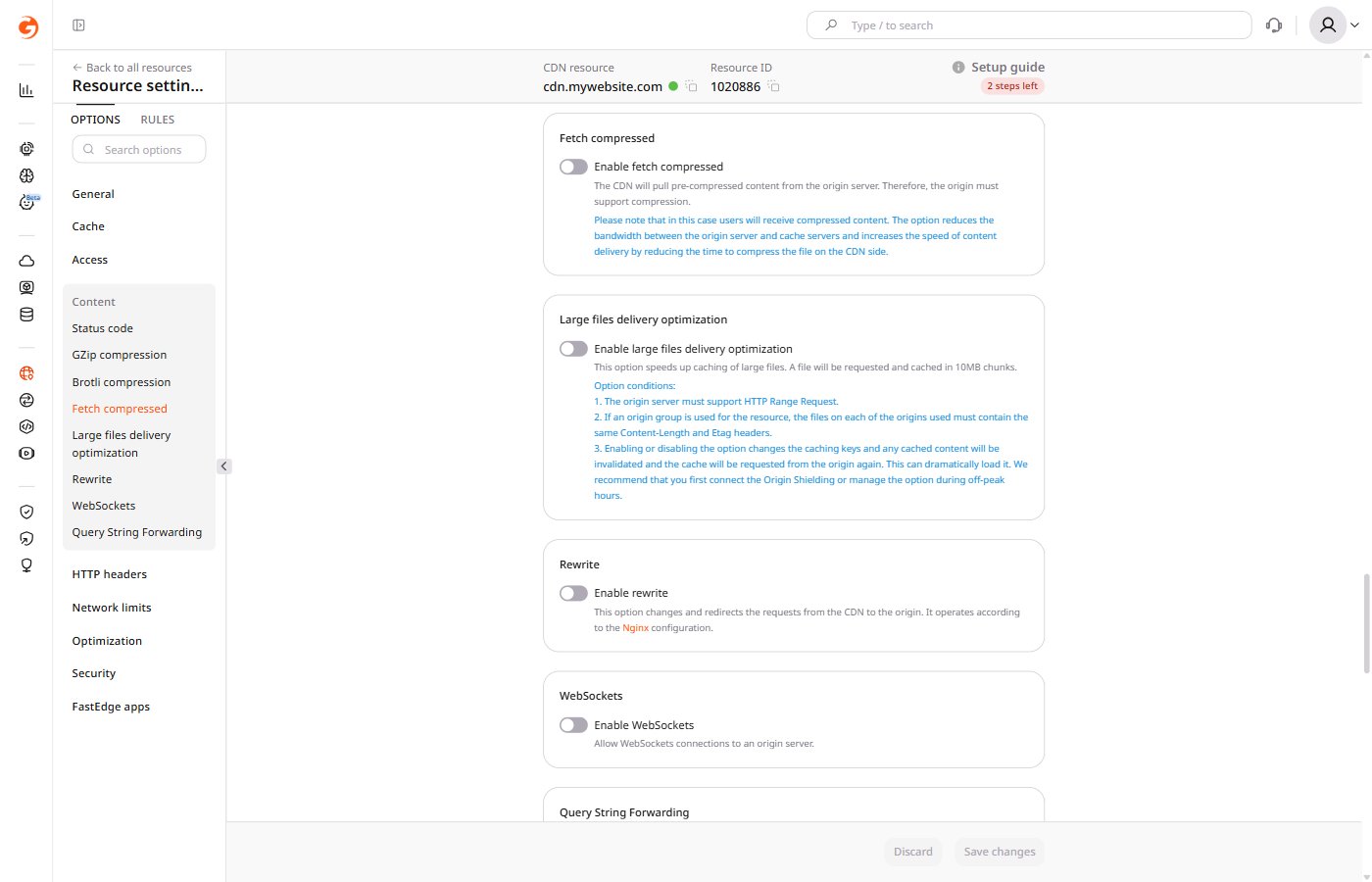 5. Click **Save changes**.
If the origin compresses content with Brotli, the CDN receives uncompressed content when Fetch compressed is enabled. To deliver Brotli-compressed content through the CDN, configure the origin to send a Brotli file when the CDN requests a GZip-encoded response.
## Behavior when enabled
When Fetch compressed is active, CDN servers treat the origin as the source of truth for content encoding.
* CDN servers do not decompress fetched content before delivering it to end users. End users receive compressed content regardless of whether the browser accepts compression.
* **Fetch compressed** and [GZip compression](/cdn/cdn-resource-options/compression/configure-gzip-and-brotli-compression#gzip) cannot be active simultaneously — enabling one disables the other.
## Compression without CDN settings
When Fetch compressed and other CDN compression options are disabled, compression can be controlled by the origin server using `Accept-Encoding`, `Content-Encoding`, and `Vary` headers. Compression behavior then depends on whether the origin supports it.
### Origin supports compression
To deliver either compressed or uncompressed content per request, disable all compression settings on the CDN resource. Then configure two HTTP headers on the origin server: `Vary: Accept-Encoding` and `Content-Encoding`.
CDN servers check the `Accept-Encoding` header in every request from end users. If the header includes `gzip`, `deflate`, or `br`, the CDN requests the compressed version from the origin. If those directives are absent, the CDN requests the uncompressed version.
* If `Vary: Accept-Encoding` is not set on the origin server, CDN caches the first version it receives — compressed or uncompressed. A user who needs the other version will receive the cached copy, which the browser may fail to display correctly.
* If `Vary: Accept-Encoding` is set, CDN caches both versions separately and serves the correct one per request.
### Origin does not support compression
CDN stores the uncompressed file. End users receive the uncompressed version regardless of whether the request includes compression headers.
5. Click **Save changes**.
If the origin compresses content with Brotli, the CDN receives uncompressed content when Fetch compressed is enabled. To deliver Brotli-compressed content through the CDN, configure the origin to send a Brotli file when the CDN requests a GZip-encoded response.
## Behavior when enabled
When Fetch compressed is active, CDN servers treat the origin as the source of truth for content encoding.
* CDN servers do not decompress fetched content before delivering it to end users. End users receive compressed content regardless of whether the browser accepts compression.
* **Fetch compressed** and [GZip compression](/cdn/cdn-resource-options/compression/configure-gzip-and-brotli-compression#gzip) cannot be active simultaneously — enabling one disables the other.
## Compression without CDN settings
When Fetch compressed and other CDN compression options are disabled, compression can be controlled by the origin server using `Accept-Encoding`, `Content-Encoding`, and `Vary` headers. Compression behavior then depends on whether the origin supports it.
### Origin supports compression
To deliver either compressed or uncompressed content per request, disable all compression settings on the CDN resource. Then configure two HTTP headers on the origin server: `Vary: Accept-Encoding` and `Content-Encoding`.
CDN servers check the `Accept-Encoding` header in every request from end users. If the header includes `gzip`, `deflate`, or `br`, the CDN requests the compressed version from the origin. If those directives are absent, the CDN requests the uncompressed version.
* If `Vary: Accept-Encoding` is not set on the origin server, CDN caches the first version it receives — compressed or uncompressed. A user who needs the other version will receive the cached copy, which the browser may fail to display correctly.
* If `Vary: Accept-Encoding` is set, CDN caches both versions separately and serves the correct one per request.
### Origin does not support compression
CDN stores the uncompressed file. End users receive the uncompressed version regardless of whether the request includes compression headers.