> ## Documentation Index
> Fetch the complete documentation index at: https://gcore-doc-1894.mintlify.site/llms.txt
> Use this file to discover all available pages before exploring further.
# Create a CDN resource rule template manually or use a system one
A template is a preset rule for CDN resources — it contains all necessary settings: file paths, an origin pull protocol, and enabled and disabled options. Adding a rule from a template takes three clicks: open the **Rules** tab, select a template, and click **Create rule**.
Gcore provides built-in templates called **System**. Custom templates can also be created.
## Create a template
Configure the file paths, origin pull protocol, and any additional options to define a reusable rule template.
1\. In the CDN resource settings, open the **Rules** tab, navigate to the **Templates** section and click **Create template**.
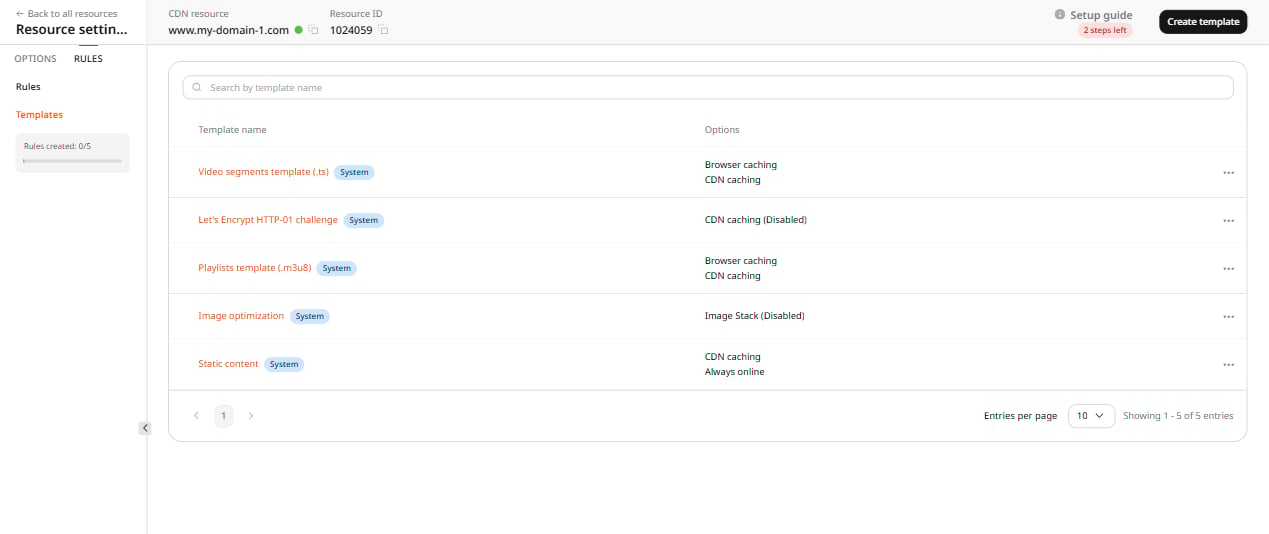 Complete the remaining steps on the **Create template** page.
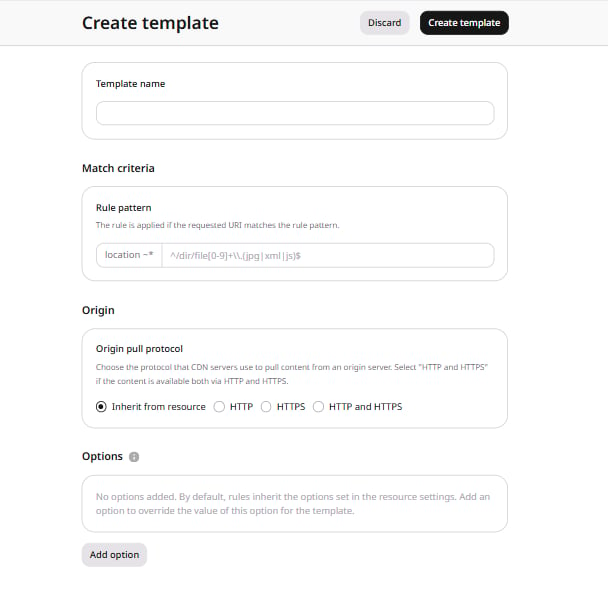 2\. Specify the template name. Templates can be searched by name after creation.
3\. Specify the path to the file or folder for which the rule will be applied. The path must start with `^/` or `/`. URLs and [regular expressions](https://en.wikipedia.org/wiki/Regular_expression) are both supported.
4\. Select the protocol that the CDN resource will use to pull the files specified at Step 3. If files are accessible over the same protocol as an origin, select **Inherit from resource**. If not, select the appropriate option: HTTP, HTTPS or both protocols at once.
5\. (Optional) View the list of additional options and configure the necessary ones.
6\. Click **Create template**.
## Use a system template
System templates are built-in presets covering common CDN use cases. They are labeled **System** in the Templates section.
**Video segments template (.ts)** is a rule template for caching chunks ([streaming via CDN](/cdn/getting-started/create-a-cdn-resource/create-a-cdn-resource-for-video-streaming#create-a-cdn-resource-for-video-streaming)).
**Playlists template (.m3u8)** is a rule template for caching playlists ([streaming via CDN](/cdn/getting-started/create-a-cdn-resource/create-a-cdn-resource-for-video-streaming#create-a-cdn-resource-for-video-streaming)).
**Let's Encrypt HTTP-01 challenge** is a rule template for validating a Let's Encrypt certificate that is issued with the [HTTP-01 challenge](https://letsencrypt.org/docs/challenge-types) method and not via the Gcore UI. For the certificate to be validated, create a CDN resource, create a rule from the template, and only then request a certificate. Without this rule, the resource settings will block certificate validation.
**Static content** is a rule template for caching static files of the resources integrated with the DNS.
**Image optimization** is a rule template for optimizing images using [Image Stack](/cdn/cdn-resource-options/image-optimization-paid/about-image-stack) (paid add-on; [enable Image Stack](/cdn/cdn-resource-options/image-optimization-paid/enable-image-stack) in the resource options before using this template). Add a rule from the Image optimization template to the resource, and image optimization will be applied to matching files. To optimize only specific files, edit the file path when creating the rule.
## Create a rule from a template
Applying a template pre-fills the rule form with saved settings, so only final adjustments are needed before saving.
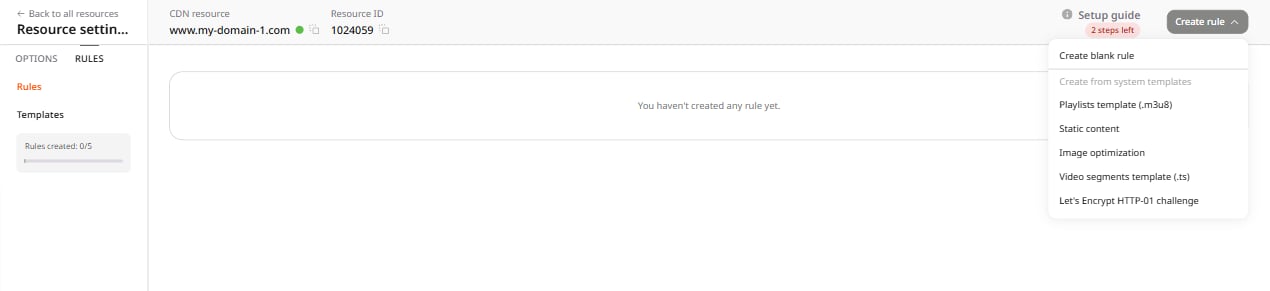
1\. Open the settings of the required CDN resource. In the **Rules** tab, click **Create rule** and select a template from the list.
2\. Specify the template name. Templates can be searched by name after creation.
3\. Specify the path to the file or folder for which the rule will be applied. The path must start with `^/` or `/`. URLs and [regular expressions](https://en.wikipedia.org/wiki/Regular_expression) are both supported.
4\. Select the protocol that the CDN resource will use to pull the files specified at Step 3. If files are accessible over the same protocol as an origin, select **Inherit from resource**. If not, select the appropriate option: HTTP, HTTPS or both protocols at once.
5\. (Optional) View the list of additional options and configure the necessary ones.
6\. Click **Create template**.
## Use a system template
System templates are built-in presets covering common CDN use cases. They are labeled **System** in the Templates section.
**Video segments template (.ts)** is a rule template for caching chunks ([streaming via CDN](/cdn/getting-started/create-a-cdn-resource/create-a-cdn-resource-for-video-streaming#create-a-cdn-resource-for-video-streaming)).
**Playlists template (.m3u8)** is a rule template for caching playlists ([streaming via CDN](/cdn/getting-started/create-a-cdn-resource/create-a-cdn-resource-for-video-streaming#create-a-cdn-resource-for-video-streaming)).
**Let's Encrypt HTTP-01 challenge** is a rule template for validating a Let's Encrypt certificate that is issued with the [HTTP-01 challenge](https://letsencrypt.org/docs/challenge-types) method and not via the Gcore UI. For the certificate to be validated, create a CDN resource, create a rule from the template, and only then request a certificate. Without this rule, the resource settings will block certificate validation.
**Static content** is a rule template for caching static files of the resources integrated with the DNS.
**Image optimization** is a rule template for optimizing images using [Image Stack](/cdn/cdn-resource-options/image-optimization-paid/about-image-stack) (paid add-on; [enable Image Stack](/cdn/cdn-resource-options/image-optimization-paid/enable-image-stack) in the resource options before using this template). Add a rule from the Image optimization template to the resource, and image optimization will be applied to matching files. To optimize only specific files, edit the file path when creating the rule.
## Create a rule from a template
Applying a template pre-fills the rule form with saved settings, so only final adjustments are needed before saving.
1\. Open the settings of the required CDN resource. In the **Rules** tab, click **Create rule** and select a template from the list.
 2\. The form opens with pre-filled settings from the template. Review the settings and edit them if needed.
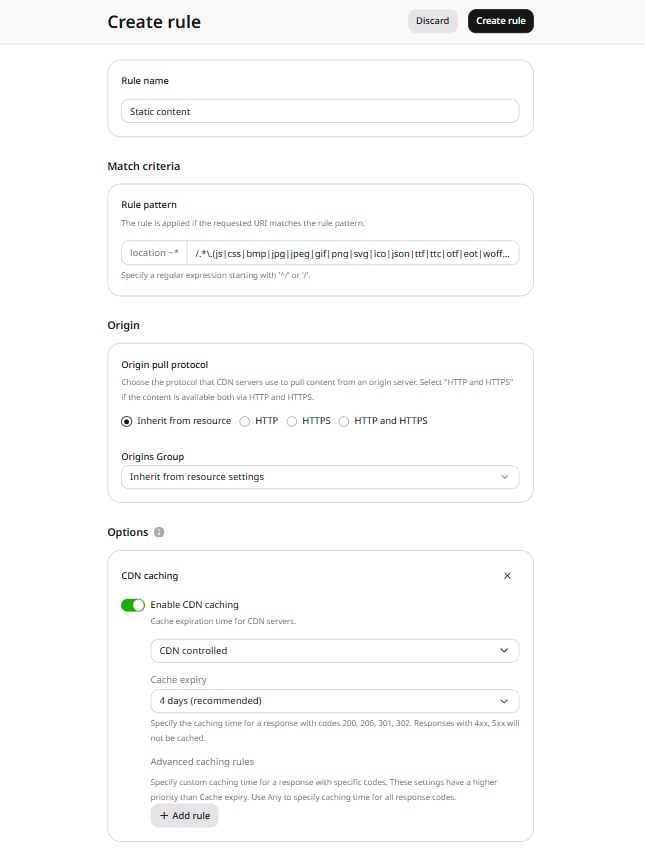 3\. Click **Create rule**.