> ## Documentation Index
> Fetch the complete documentation index at: https://gcore-doc-1894.mintlify.site/llms.txt
> Use this file to discover all available pages before exploring further.
# Specify TLS versions allowed for content requests from the CDN
The **Change TLS versions** option controls which TLS protocol versions end users can use when connecting to a CDN resource over HTTPS. By default, the option is disabled and all protocol versions are allowed: SSLv3, TLSv1, TLSv1.1, TLSv1.2, TLSv1.3.
When the option is enabled, only the versions listed in the configuration are accepted. Requests from clients using any other version are rejected. TLSv1.2 and TLSv1.3 are the recommended versions — older versions (SSLv3, TLSv1, TLSv1.1) are deprecated and considered insecure.
To configure allowed TLS versions:
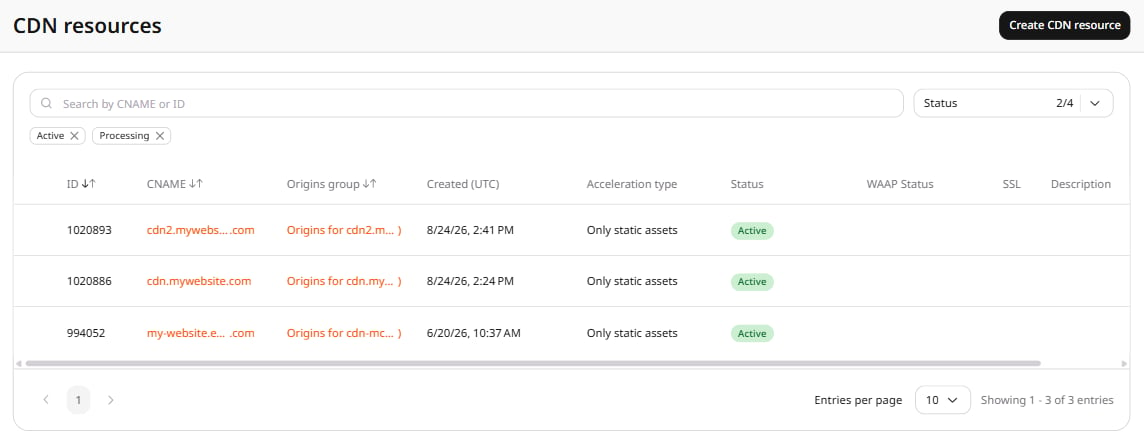
1. In the [Gcore Customer Portal](https://portal.gcore.com), navigate to **CDN**. The **CDN resources** page opens.
2. Click the CNAME of the resource to open its settings.
 3. Open the **OPTIONS** tab and scroll to the **Access** section. Click **TLS versions** in the left sidebar.
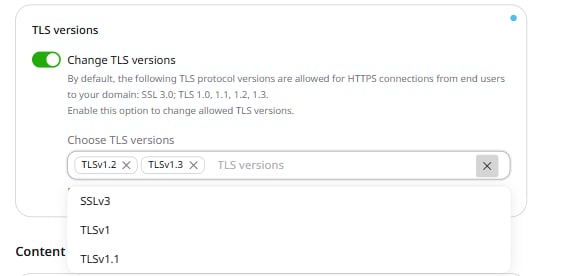
4. Turn on the **Change TLS versions** toggle. The **Choose TLS versions** field appears, pre-populated with TLSv1.2 and TLSv1.3.
5. Add or remove protocol versions as needed. To add a version, click the field and select from the dropdown. To remove a version, click **×** next to it.
3. Open the **OPTIONS** tab and scroll to the **Access** section. Click **TLS versions** in the left sidebar.
4. Turn on the **Change TLS versions** toggle. The **Choose TLS versions** field appears, pre-populated with TLSv1.2 and TLSv1.3.
5. Add or remove protocol versions as needed. To add a version, click the field and select from the dropdown. To remove a version, click **×** next to it.
 6. Click **Save changes**.