> ## Documentation Index
> Fetch the complete documentation index at: https://gcore-doc-1894.mintlify.site/llms.txt
> Use this file to discover all available pages before exploring further.
# Configure and use secure token
Secure token restricts content access to URLs that contain a valid MD5 hash and a Unix expiration timestamp. The CDN rejects requests with a missing, expired, or incorrect hash with a `403 Forbidden` response.
## Configure secure token in the Customer Portal
1. Log in to the [Gcore Customer Portal](https://portal.gcore.com) and navigate to **CDN** > **CDN resources**. Open the resource.
2. On the **OPTIONS** tab, navigate to **Access** > **Secure token**.
3. Turn on **Enable secure token**.
4. In the **Enter a key** field, enter a key of 6–32 characters. This key is used in the hash formula on the origin server.
5. To allow access from any IP address, leave **Add a client's IP to the token** unchecked. To restrict access to a single IP address, check it — the allowlisted IP is added to the hash formula in the [generation scripts](#scripts-for-link-generation). Enterprise customers with mobile audiences have an [IP binding](#ip-binding-and-mobile-networks) mode that ties tokens to a subnet rather than a single IP.
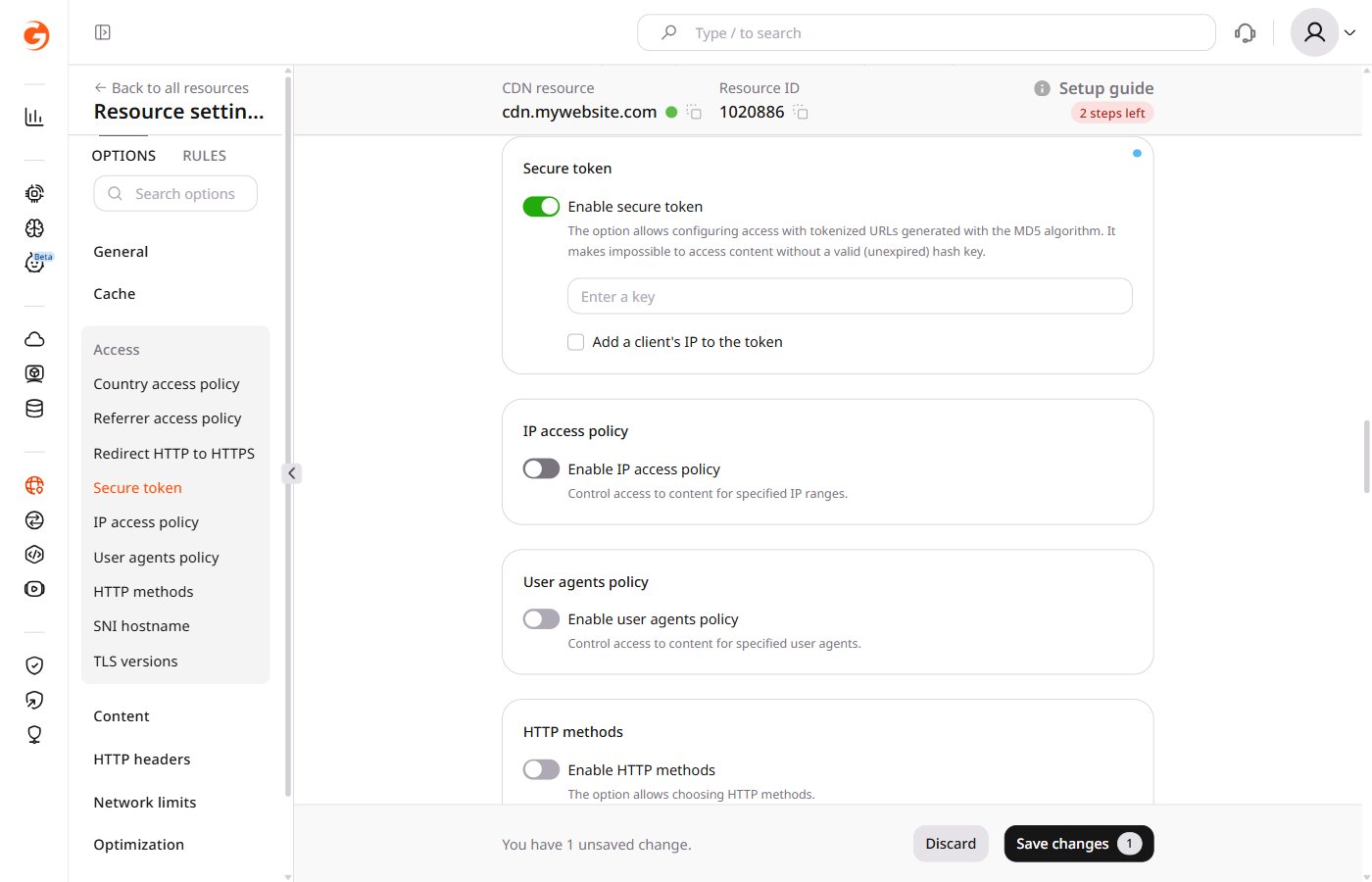 6. Click **Save changes**.
Enabling secure token may decrease the cache hit ratio. To improve it, enable [Ignore Query String](/cdn/cdn-resource-options/cache/ignore-the-set-cookie-or-query-string-parameters-when-caching-content-on-cdn-servers#query-string-setting), which treats objects with different query parameters as one cacheable object.
## Set up token generation on the origin server
On the origin server, add a script that generates signed links for protected content. Each generated link must follow this format:
```text theme={null}
http://cdn.example.com/photo.jpeg?md5=DMF1ucDxtHCxwYQ&expires=2147483647
```
Where:
* `http://cdn.example.com/photo.jpeg` is the path to the file
* `DMF1ucDxtHCxwYQ` is the MD5 hash of `{expires}{path}{ip} {key}` (base64-encoded, URL-safe)
* `2147483647` is the expiration time in Unix timestamp format
The [link generation scripts](#scripts-for-link-generation) below contain ready-to-use PHP, Python, and OpenSSL examples.
On the origin server, block direct client access to the origin — restricting inbound connections to CDN server IP ranges is one approach. The CDN validates the token at the edge before forwarding the request to the origin, so the origin does not need to perform token validation and must remain reachable by CDN servers without a token.
## Secure token URL matching
Secure token validates three things from the request URL:
* `md5`: the token hash
* `expires`: the Unix timestamp until which the URL is valid
* Path: the file path or directory path used when the token was generated
The path is important. The CDN recomputes the hash using the path that was used to generate the token, not necessarily the full requested path:
* If the token was generated for an exact file path (e.g. `/images/poster.jpeg`), the CDN computes the hash with that same path on every request. Only requests for that exact file pass.
* If the token was generated for a directory path ending with `/` (e.g. `/videos/video-1/`), the CDN computes the hash using the **directory component** of the requested path. A request for `/videos/video-1/segment-001.ts` uses `/videos/video-1/` as the path in the hash and passes. A request for `/videos/video-1/360p/segment.ts` uses `/videos/video-1/360p/` as the directory component — that does not match the token generated for `/videos/video-1/`, so it returns `403 Forbidden`.
[Query String Forwarding](/cdn/cdn-resource-options/query-string-forwarding) is a separate mechanism that copies `md5` and `expires` from playlist body links to the actual media segment requests. It allows a player to receive the token with the master manifest and automatically propagate it to nested requests, each of which is still individually validated against the token path.
### Token for exact file
Use an exact file token for standalone files — images, archives, MP4 files, or a single protected video manifest — when nested requests do not need to be authorized with the same token.
Example protected file:
```text theme={null}
/images/poster.jpeg
```
Generate the token with this path:
```text theme={null}
/images/poster.jpeg
```
The user requests:
```text theme={null}
https://cdn.example.com/images/poster.jpeg?md5=TOKEN&expires=1777545540
```
This token is valid only for `/images/poster.jpeg`. It does not provide access to adjacent files:
```text theme={null}
https://cdn.example.com/images/poster.webp → 403 Forbidden
https://cdn.example.com/images/poster.png → 403 Forbidden
https://cdn.example.com/images/master.m3u8 → 403 Forbidden
```
### Protect HLS and MPEG-DASH content
Use a token with Query String Forwarding enabled for HLS and MPEG-DASH when the player must request a master manifest, nested rendition manifests, media segments, and subtitles under the same path.
In this mode, generate the token for the full directory path only — not for a filename. For the files in:
```text theme={null}
/videos/video-1/
```
use this path in the token generation script:
For PHP:
```php theme={null}
$path = '/videos/video-1/';
```
For Python:
```py theme={null}
path = "/videos/video-1/"
```
This token works only for files directly inside `/videos/video-1/`. It does not work for files in subdirectories — `/videos/video-1/360p/` for instance. If HLS or MPEG-DASH files are split across subdirectories, generate tokens for those directories separately or place the related manifests and segments under one directory.
Example HLS files:
```text theme={null}
/videos/video-1/master.m3u8
/videos/video-1/rendition-1080.m3u8
/videos/video-1/segment-001.ts
/videos/video-1/segment-002.ts
```
Generate the token with the directory path:
```text theme={null}
/videos/video-1/
```
The user requests only the master manifest with the token:
```text theme={null}
https://cdn.example.com/videos/video-1/master.m3u8?md5=TOKEN&expires=1893456000
```
With [Query String Forwarding](/cdn/cdn-resource-options/query-string-forwarding) enabled, the CDN automatically inserts the same query parameters into related manifest body links. The video player then requests nested files with the forwarded token:
```text theme={null}
https://cdn.example.com/videos/video-1/rendition-1080.m3u8?md5=TOKEN&expires=1893456000
https://cdn.example.com/videos/video-1/segment-001.ts?md5=TOKEN&expires=1893456000
https://cdn.example.com/videos/video-1/segment-002.ts?md5=TOKEN&expires=1893456000
```
For HLS and MPEG-DASH, configure Query String Forwarding with:
```json theme={null}
{
"forward_from_file_types": [
"m3u8",
"mpd"
],
"forward_to_file_types": [
"ts",
"mp4",
"m3u8",
"m4s",
"vtt"
],
"forward_only_keys": [
"md5",
"expires"
]
}
```
To check how Query String Forwarding works in real life, open this demo HLS manifest:
* manifest URL: [master.m3u8](http://demo-files-protected.gvideo.io/coffee_run/master.m3u8?md5=eBx15p01_a9JNuo1iZpTfQ\&expires=1893456000\&other=parameter)
* hls.js player demo: [master.m3u8](https://hlsjs.video-dev.org/demo/?src=https%3A%2F%2Fdemo-files-protected.gvideo.io%2Fcoffee_run%2Fmasterm3u8%3Fmd5%3DeBx15p01_a9JNuo1iZpTfQ%26expires%3D1893456000%26other%3Dparameter)
It will open the master file with nested files (note that `&other=parameter` is not forwarded):
```text theme={null}
http://demo-files-protected.gvideo.io/coffee_run/master.m3u8?md5=eBx15p01_a9JNuo1iZpTfQ&expires=1893456000&other=parameter
http://demo-files-protected.gvideo.io/coffee_run/index-svod720n-v1-a1.m3u8?expires=1893456000&md5=eBx15p01_a9JNuo1iZpTfQ
http://demo-files-protected.gvideo.io/coffee_run/segment-1-svod720n-v1-a1.ts?expires=1893456000&md5=eBx15p01_a9JNuo1iZpTfQ
http://demo-files-protected.gvideo.io/coffee_run/segment-2-svod720n-v1-a1.ts?expires=1893456000&md5=eBx15p01_a9JNuo1iZpTfQ
```
### Token in a path
Tokens embedded into the URL path are not supported for CDN natively. This option is available for [Gcore Video Streaming](/streaming/interaction-with-cdn/video-secure-token):
```text theme={null}
https://cdn.example.com/secure/TOKEN/1777545540/coffee_run/master.m3u8
https://cdn.example.com/secure/TOKEN/1777545540/coffee_run/rendition-1080.m3u8
https://cdn.example.com/secure/TOKEN/1777545540/coffee_run/segment-001.ts
```
Example of token in path for Gcore Video Streaming:
```text theme={null}
https://demo-protected.gvideo.io/videos/2675_pG8TfmKx2LU2qs/rI1224fiE3USCa8qYnMuGQ/1861919999/master.m3u8
```
Where:
* `https://demo-protected.gvideo.io` is the CDN URL
* `/videos/2675_pG8TfmKx2LU2qs/` is the video ID
* `rI1224fiE3USCa8qYnMuGQ` is the token
* `1861919999` is the expiration time in Unix timestamp format
## Scripts for link generation
### PHP
Script with IP-based access restriction — the file is accessible only from the allowlisted IP address until the link expires:
```php theme={null}
6. Click **Save changes**.
Enabling secure token may decrease the cache hit ratio. To improve it, enable [Ignore Query String](/cdn/cdn-resource-options/cache/ignore-the-set-cookie-or-query-string-parameters-when-caching-content-on-cdn-servers#query-string-setting), which treats objects with different query parameters as one cacheable object.
## Set up token generation on the origin server
On the origin server, add a script that generates signed links for protected content. Each generated link must follow this format:
```text theme={null}
http://cdn.example.com/photo.jpeg?md5=DMF1ucDxtHCxwYQ&expires=2147483647
```
Where:
* `http://cdn.example.com/photo.jpeg` is the path to the file
* `DMF1ucDxtHCxwYQ` is the MD5 hash of `{expires}{path}{ip} {key}` (base64-encoded, URL-safe)
* `2147483647` is the expiration time in Unix timestamp format
The [link generation scripts](#scripts-for-link-generation) below contain ready-to-use PHP, Python, and OpenSSL examples.
On the origin server, block direct client access to the origin — restricting inbound connections to CDN server IP ranges is one approach. The CDN validates the token at the edge before forwarding the request to the origin, so the origin does not need to perform token validation and must remain reachable by CDN servers without a token.
## Secure token URL matching
Secure token validates three things from the request URL:
* `md5`: the token hash
* `expires`: the Unix timestamp until which the URL is valid
* Path: the file path or directory path used when the token was generated
The path is important. The CDN recomputes the hash using the path that was used to generate the token, not necessarily the full requested path:
* If the token was generated for an exact file path (e.g. `/images/poster.jpeg`), the CDN computes the hash with that same path on every request. Only requests for that exact file pass.
* If the token was generated for a directory path ending with `/` (e.g. `/videos/video-1/`), the CDN computes the hash using the **directory component** of the requested path. A request for `/videos/video-1/segment-001.ts` uses `/videos/video-1/` as the path in the hash and passes. A request for `/videos/video-1/360p/segment.ts` uses `/videos/video-1/360p/` as the directory component — that does not match the token generated for `/videos/video-1/`, so it returns `403 Forbidden`.
[Query String Forwarding](/cdn/cdn-resource-options/query-string-forwarding) is a separate mechanism that copies `md5` and `expires` from playlist body links to the actual media segment requests. It allows a player to receive the token with the master manifest and automatically propagate it to nested requests, each of which is still individually validated against the token path.
### Token for exact file
Use an exact file token for standalone files — images, archives, MP4 files, or a single protected video manifest — when nested requests do not need to be authorized with the same token.
Example protected file:
```text theme={null}
/images/poster.jpeg
```
Generate the token with this path:
```text theme={null}
/images/poster.jpeg
```
The user requests:
```text theme={null}
https://cdn.example.com/images/poster.jpeg?md5=TOKEN&expires=1777545540
```
This token is valid only for `/images/poster.jpeg`. It does not provide access to adjacent files:
```text theme={null}
https://cdn.example.com/images/poster.webp → 403 Forbidden
https://cdn.example.com/images/poster.png → 403 Forbidden
https://cdn.example.com/images/master.m3u8 → 403 Forbidden
```
### Protect HLS and MPEG-DASH content
Use a token with Query String Forwarding enabled for HLS and MPEG-DASH when the player must request a master manifest, nested rendition manifests, media segments, and subtitles under the same path.
In this mode, generate the token for the full directory path only — not for a filename. For the files in:
```text theme={null}
/videos/video-1/
```
use this path in the token generation script:
For PHP:
```php theme={null}
$path = '/videos/video-1/';
```
For Python:
```py theme={null}
path = "/videos/video-1/"
```
This token works only for files directly inside `/videos/video-1/`. It does not work for files in subdirectories — `/videos/video-1/360p/` for instance. If HLS or MPEG-DASH files are split across subdirectories, generate tokens for those directories separately or place the related manifests and segments under one directory.
Example HLS files:
```text theme={null}
/videos/video-1/master.m3u8
/videos/video-1/rendition-1080.m3u8
/videos/video-1/segment-001.ts
/videos/video-1/segment-002.ts
```
Generate the token with the directory path:
```text theme={null}
/videos/video-1/
```
The user requests only the master manifest with the token:
```text theme={null}
https://cdn.example.com/videos/video-1/master.m3u8?md5=TOKEN&expires=1893456000
```
With [Query String Forwarding](/cdn/cdn-resource-options/query-string-forwarding) enabled, the CDN automatically inserts the same query parameters into related manifest body links. The video player then requests nested files with the forwarded token:
```text theme={null}
https://cdn.example.com/videos/video-1/rendition-1080.m3u8?md5=TOKEN&expires=1893456000
https://cdn.example.com/videos/video-1/segment-001.ts?md5=TOKEN&expires=1893456000
https://cdn.example.com/videos/video-1/segment-002.ts?md5=TOKEN&expires=1893456000
```
For HLS and MPEG-DASH, configure Query String Forwarding with:
```json theme={null}
{
"forward_from_file_types": [
"m3u8",
"mpd"
],
"forward_to_file_types": [
"ts",
"mp4",
"m3u8",
"m4s",
"vtt"
],
"forward_only_keys": [
"md5",
"expires"
]
}
```
To check how Query String Forwarding works in real life, open this demo HLS manifest:
* manifest URL: [master.m3u8](http://demo-files-protected.gvideo.io/coffee_run/master.m3u8?md5=eBx15p01_a9JNuo1iZpTfQ\&expires=1893456000\&other=parameter)
* hls.js player demo: [master.m3u8](https://hlsjs.video-dev.org/demo/?src=https%3A%2F%2Fdemo-files-protected.gvideo.io%2Fcoffee_run%2Fmasterm3u8%3Fmd5%3DeBx15p01_a9JNuo1iZpTfQ%26expires%3D1893456000%26other%3Dparameter)
It will open the master file with nested files (note that `&other=parameter` is not forwarded):
```text theme={null}
http://demo-files-protected.gvideo.io/coffee_run/master.m3u8?md5=eBx15p01_a9JNuo1iZpTfQ&expires=1893456000&other=parameter
http://demo-files-protected.gvideo.io/coffee_run/index-svod720n-v1-a1.m3u8?expires=1893456000&md5=eBx15p01_a9JNuo1iZpTfQ
http://demo-files-protected.gvideo.io/coffee_run/segment-1-svod720n-v1-a1.ts?expires=1893456000&md5=eBx15p01_a9JNuo1iZpTfQ
http://demo-files-protected.gvideo.io/coffee_run/segment-2-svod720n-v1-a1.ts?expires=1893456000&md5=eBx15p01_a9JNuo1iZpTfQ
```
### Token in a path
Tokens embedded into the URL path are not supported for CDN natively. This option is available for [Gcore Video Streaming](/streaming/interaction-with-cdn/video-secure-token):
```text theme={null}
https://cdn.example.com/secure/TOKEN/1777545540/coffee_run/master.m3u8
https://cdn.example.com/secure/TOKEN/1777545540/coffee_run/rendition-1080.m3u8
https://cdn.example.com/secure/TOKEN/1777545540/coffee_run/segment-001.ts
```
Example of token in path for Gcore Video Streaming:
```text theme={null}
https://demo-protected.gvideo.io/videos/2675_pG8TfmKx2LU2qs/rI1224fiE3USCa8qYnMuGQ/1861919999/master.m3u8
```
Where:
* `https://demo-protected.gvideo.io` is the CDN URL
* `/videos/2675_pG8TfmKx2LU2qs/` is the video ID
* `rI1224fiE3USCa8qYnMuGQ` is the token
* `1861919999` is the expiration time in Unix timestamp format
## Scripts for link generation
### PHP
Script with IP-based access restriction — the file is accessible only from the allowlisted IP address until the link expires:
```php theme={null}