> ## Documentation Index
> Fetch the complete documentation index at: https://gcore-doc-1894.mintlify.site/llms.txt
> Use this file to discover all available pages before exploring further.
# Clear CDN resource cache by URL, pattern, or all and check purge history
[Purge](https://portal.gcore.com/cdn/purge/purge-request) is an option that clears the CDN resource cache. Use it when content on the origin is updated and waiting for natural cache expiration is not acceptable, or when CDN servers are serving incorrect content.
Three options are available for clearing the cache:
1. **Purge by URL (recommended)** to remove content that belongs to a particular URL from the cache without impacting other cached items.
2. **Purge all** to remove all data from the cache.
3. **Purge by pattern** to remove content selectively by specifying path patterns with the `*` operator that can replace any number of symbols.
The cache can be cleared in the [Gcore Customer Portal](https://portal.gcore.com) or via the [CDN Purge API](/api-reference/cdn/tools/purge-cache).
## Configure purge in the Gcore Customer Portal
1. In the Customer Portal, navigate to **CDN** → **Purge** → **Purge request**.
The Purge request page opens.
2. Select the relevant CDN resource from the dropdown menu.
3. Select the desired purge type by clicking the radio button next to it, then follow the instructions below.
4. Click the **Purge** button.
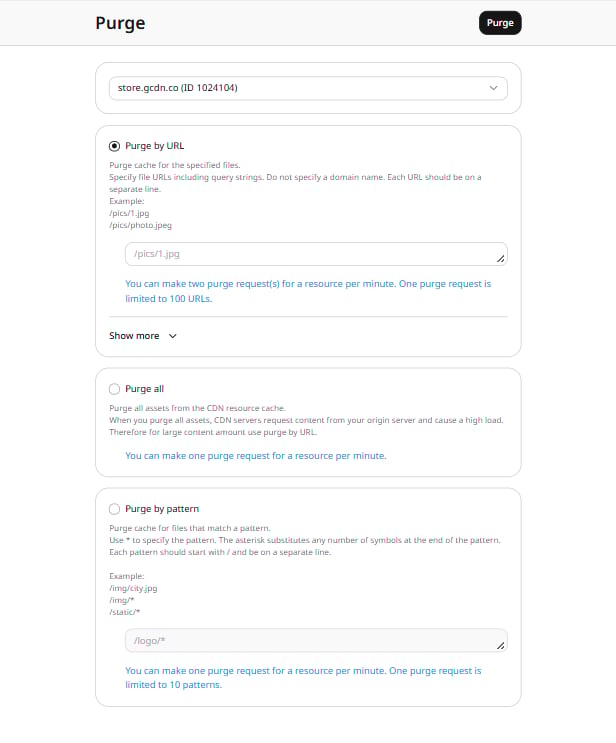 Two purge requests per resource per minute are allowed. One purge request is limited to 100 URLs, so up to 200 files can be removed from the cache per minute.
In the text area, specify one or more content URLs to purge, entering one URL per line. Links must:
* Start with a slash (/).
* Not include a protocol, domain name, or wildcard (\*).
* Include query strings if the CDN resource cache is configured to consider the query string.
To purge `https://www.example.com/pictures/icon.jpg?size=small`, specify `/pictures/icon.jpg?size=small`.
Two purge requests per resource per minute are allowed. One purge request is limited to 100 URLs, so up to 200 files can be removed from the cache per minute.
In the text area, specify one or more content URLs to purge, entering one URL per line. Links must:
* Start with a slash (/).
* Not include a protocol, domain name, or wildcard (\*).
* Include query strings if the CDN resource cache is configured to consider the query string.
To purge `https://www.example.com/pictures/icon.jpg?size=small`, specify `/pictures/icon.jpg?size=small`.
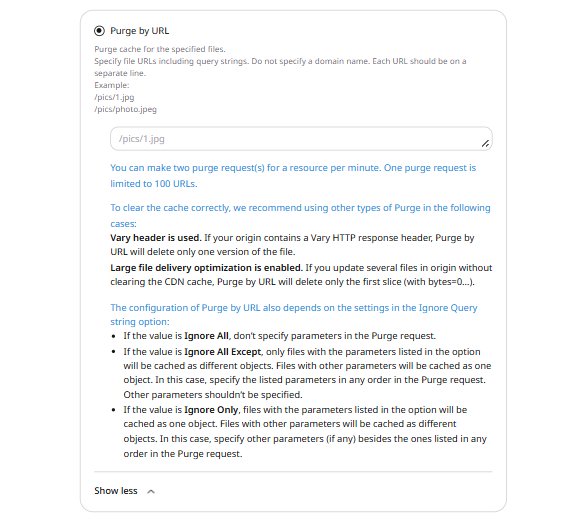 Click **Show more** under the text area to see additional recommendations.
Avoid this method in the following cases:
* **A Vary HTTP response header is present on the origin**. Purge by URL deletes only one version of the file.
* **Large file delivery optimization is enabled**. When several files on the origin are updated without clearing the CDN cache, Purge by URL deletes only the first slice (with bytes=0…).
The behavior of Purge by URL also depends on the **Ignore Query string** option:
* If the value is **Ignore All**, do not specify parameters in the Purge request.
* If the value is **Ignore All Except**, only files with the parameters listed in the option are cached as different objects. Files with other parameters are cached as one object. In this case, specify the listed parameters in any order in the Purge request. Other parameters should not be specified.
* If the value is **Ignore Only**, files with the parameters listed in the option are cached as one object. Files with other parameters are cached as different objects. In this case, specify other parameters (if any) besides the ones listed in any order in the Purge request.
One purge request per resource per minute is allowed. Purging all files causes a significant load on the origin server, because CDN servers pull all files from origin. For large amounts of content, use Purge by URL or pattern instead.
To purge all files from the cache, select **Purge all** and click the **Purge** button.
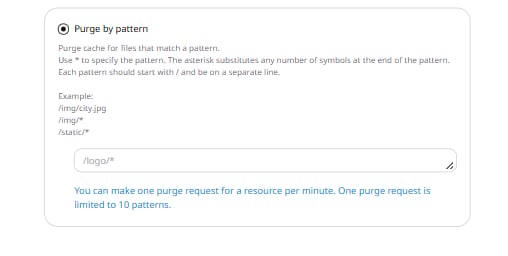
One purge request per resource per minute is allowed. One purge request is limited to 10 patterns.
To purge files by pattern, specify the path to the file or a path pattern without a domain name in the input field. Use the `*` operator, which replaces any number of symbols at the end of the pattern. Multiple `*` operators are allowed in one request. Each path must start with `/` and be on a separate line.
Click **Show more** under the text area to see additional recommendations.
Avoid this method in the following cases:
* **A Vary HTTP response header is present on the origin**. Purge by URL deletes only one version of the file.
* **Large file delivery optimization is enabled**. When several files on the origin are updated without clearing the CDN cache, Purge by URL deletes only the first slice (with bytes=0…).
The behavior of Purge by URL also depends on the **Ignore Query string** option:
* If the value is **Ignore All**, do not specify parameters in the Purge request.
* If the value is **Ignore All Except**, only files with the parameters listed in the option are cached as different objects. Files with other parameters are cached as one object. In this case, specify the listed parameters in any order in the Purge request. Other parameters should not be specified.
* If the value is **Ignore Only**, files with the parameters listed in the option are cached as one object. Files with other parameters are cached as different objects. In this case, specify other parameters (if any) besides the ones listed in any order in the Purge request.
One purge request per resource per minute is allowed. Purging all files causes a significant load on the origin server, because CDN servers pull all files from origin. For large amounts of content, use Purge by URL or pattern instead.
To purge all files from the cache, select **Purge all** and click the **Purge** button.
One purge request per resource per minute is allowed. One purge request is limited to 10 patterns.
To purge files by pattern, specify the path to the file or a path pattern without a domain name in the input field. Use the `*` operator, which replaces any number of symbols at the end of the pattern. Multiple `*` operators are allowed in one request. Each path must start with `/` and be on a separate line.
 If a query string is not specified, files with all possible query string parameters are purged from the cache according to the path pattern.
Several types of patterns are available:
| **Type and explanation** | **Purge target** | **Purge pattern** |
| ---------------------------------------------------------------------------------------------------------------------------------------------------------------------------------------------------------------------------------------------------------------------------------------------------------------------------------------- | --------------------------- | ------------------- |
| **1. Purge the selected file**
If a query string is not specified, files with all possible query string parameters are purged from the cache according to the path pattern.
Several types of patterns are available:
| **Type and explanation** | **Purge target** | **Purge pattern** |
| ---------------------------------------------------------------------------------------------------------------------------------------------------------------------------------------------------------------------------------------------------------------------------------------------------------------------------------------- | --------------------------- | ------------------- |
| **1. Purge the selected file**
Specify a file path without a domain name. As a result, all files at `cdn.site/static/image.jpg` are purged, including query string variants — `.jpg?VERSION`, for instance.
To purge only a file with a specific query string, include it in the file path: `/static/image.jpg?VERSION`. | `cdn.site/static/image.jpg` | `/static/image.jpg` |
| **2. Purge the group of files from one folder**
Use the `*` operator: `/static/*` | `cdn.site/static` | `/static/*` |
| **3. Purge the group of files with a certain type**
Use the `*` operator with the file name extension. All `.jpg` files are purged, including query string variants. | `cdn.site/static/*.jpg` | `/static/*.jpg` |
| **4. Purge the group of files having a common folder in the path**
Use the `*` operator twice. | `cdn.site/img/static/files` | `/img/*/files` |
| **5. Purge the group of files with a certain type having a common folder in the path**
Use the `*` operator with a path pattern. | `cdn.site/img/static/*.jpg` | `/img/static/*.jpg` |
## Configure purge via API
The example below shows Purge by URL via API. Examples of other purge types (all and by pattern) are in the [API documentation](/api-reference/cdn/tools/purge-cache).
| **Field** | **Value** |
| --------------------- | ------------------------------------------------------------------------------------------------------------------------------------------------------------------------------------------------------------------------------------------------------------------------------------------------------------------------------------------------------------------------ |
| **Method** | `POST` |
| **URL** | `https://api.gcore.com/cdn/resources/{{resource_id}}/purge` |
| **URL parameter** | **resource\_id**
ID of the CDN resource that the content to purge belongs to |
| **Header** | `Authorization: Bearer {{access_token}}`
`Content-Type: application/json` |
| **Payload** | **1. Purge by URL:**
`json
{
"urls": [
"/example1.jpg",
"/img/example2.png",
"/style.css?ver=2.0"
]
}
`
**2. Purge all:**
`json
{
"paths": []
}
`
**3. Purge by pattern:**
`json
{
"paths": [
"/images/*"
]
}
` |
| **Request parameter** | **urls**
(Purge by URL, required, string) An array of one or more content URLs to purge. Each URL must start with `/`.
**paths**
(Purge all) An empty array.
(Purge by pattern, required, string) An array of one or more content patterns. Each pattern must start with `/`. |
| **Response** | **201 Created**
Returns an array of the purged URLs
**400 Bad Request**
The user has exceeded the URL quota
**401 Unauthorized**
The user does not have the correct authentication credentials
**429 Too many requests**
The user has exceeded the request quota |
An [API token](/api-reference/iam/account/login) is required for authenticated requests. The example below uses Postman.
To send a purge by URL request:
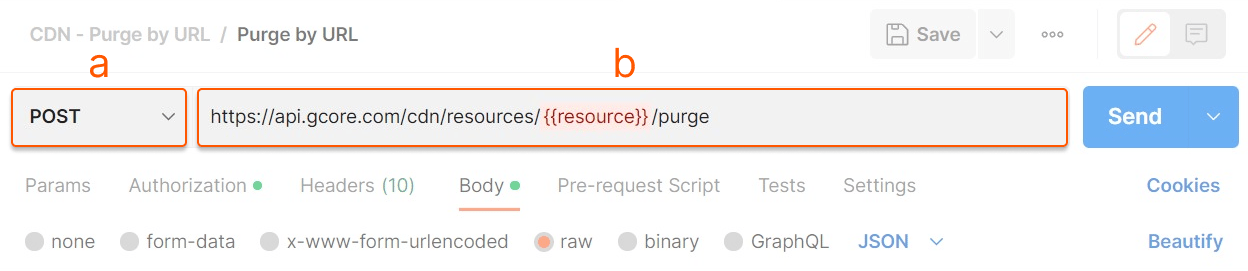
1. In Postman, open a new request tab, then do the following:
a. Set the request method to *POST*.
b. Enter the resource URL in the request URL field. Replace `{{resource_id}}` with the actual value.
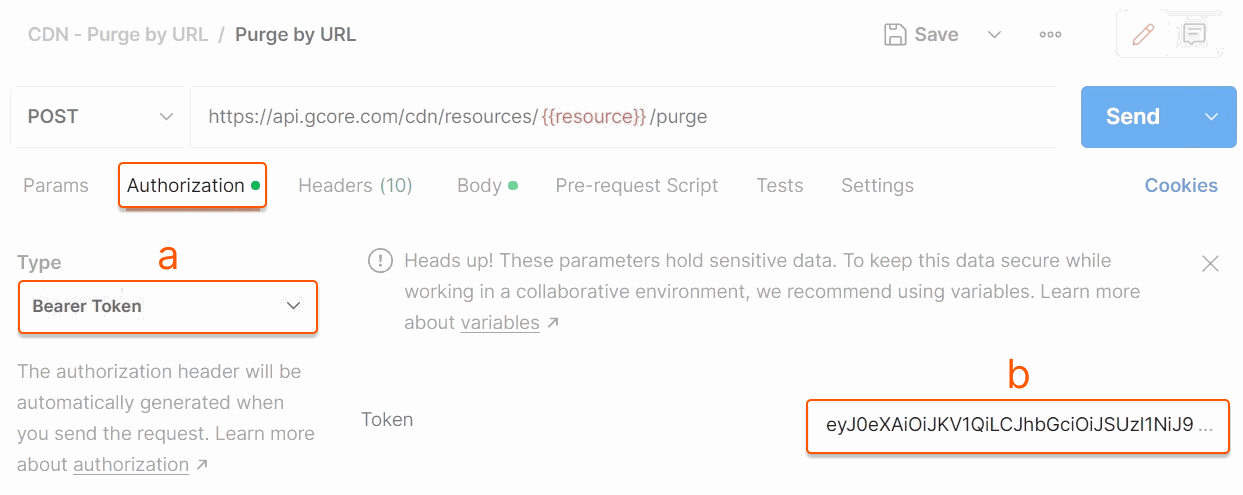
 2. Navigate to the **Authorization** tab and do the following:
a. Select *Bearer Token* from the **Type** dropdown.
b. Copy the generated access token and paste it into the **Token** field.
2. Navigate to the **Authorization** tab and do the following:
a. Select *Bearer Token* from the **Type** dropdown.
b. Copy the generated access token and paste it into the **Token** field.
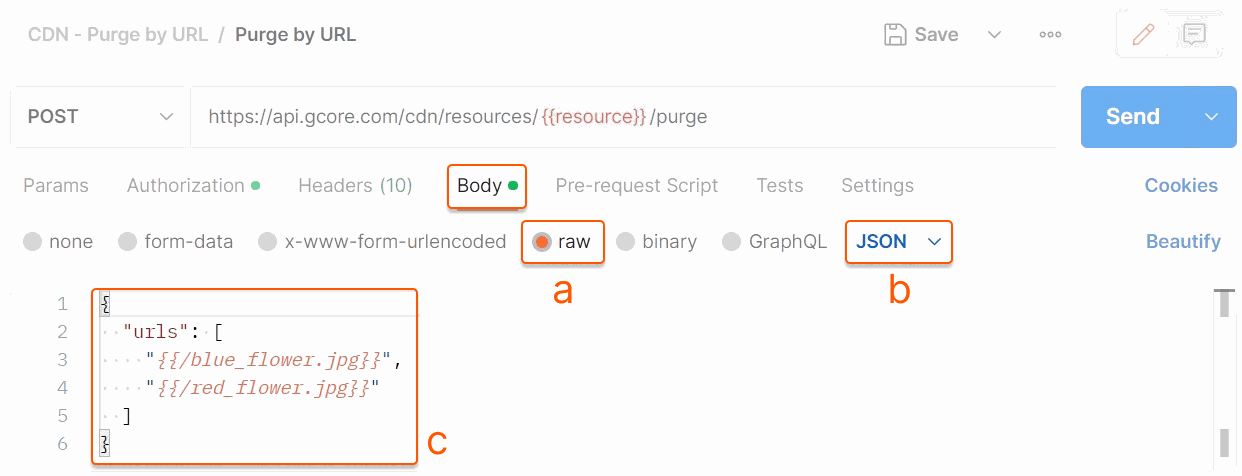
 3. Navigate to the **Body** tab and do the following:
a. Select *raw* as the data type.
b. Select *JSON* from the format dropdown.
c. Enter the payload in the text area. Replace the sample values indicated by `{{ }}` with actual values.
3. Navigate to the **Body** tab and do the following:
a. Select *raw* as the data type.
b. Select *JSON* from the format dropdown.
c. Enter the payload in the text area. Replace the sample values indicated by `{{ }}` with actual values.
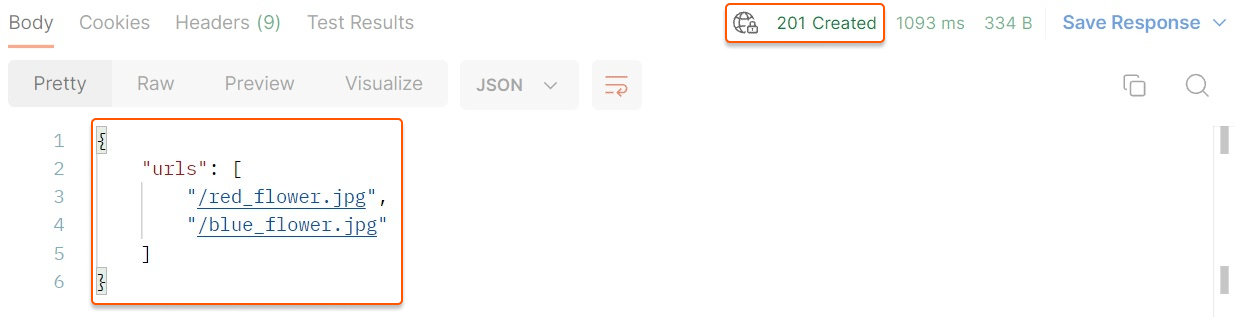
 4. Click **Send**.
If the purge is successful, the API returns HTTP 201 and a response body containing a list of purged URLs.
4. Click **Send**.
If the purge is successful, the API returns HTTP 201 and a response body containing a list of purged URLs.
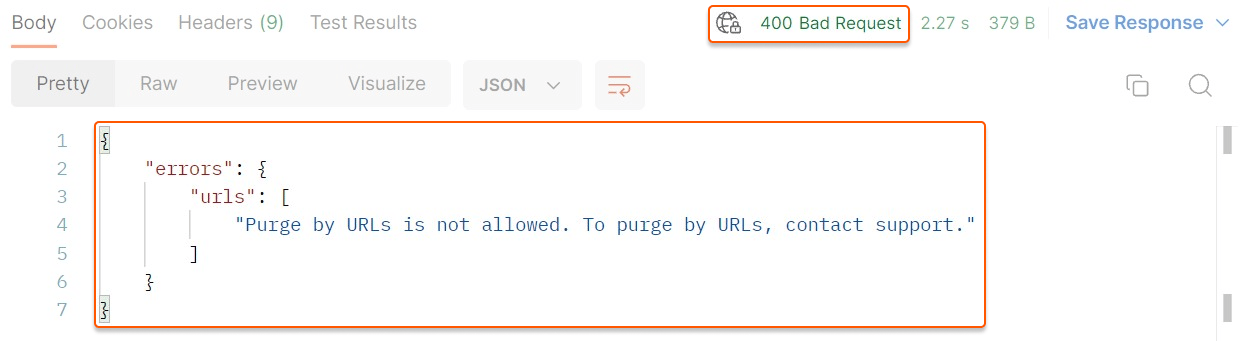
 If an error occurs, the API returns a status code and a response body describing the cause. Example:
 ## View purge history
**Purge history** is the section where the status of all purge requests can be checked.
Purge history stores requests for the past month only.
To view the history, navigate to the [Purge history](https://portal.gcore.com/cdn/purge/purge-history) page. The page displays all existing requests.
Use filters to display specific requests:
* **Search by CNAME.** Specify the CNAME of the CDN resource.
* **Type.** Select the purge type (Purge by URL, Purge all, or Purge by pattern).
* **Status.** Select the status (In progress, Successful, Failed, or Status report disabled).
* **Date.** Set the time period (up to one month).
## View purge history
**Purge history** is the section where the status of all purge requests can be checked.
Purge history stores requests for the past month only.
To view the history, navigate to the [Purge history](https://portal.gcore.com/cdn/purge/purge-history) page. The page displays all existing requests.
Use filters to display specific requests:
* **Search by CNAME.** Specify the CNAME of the CDN resource.
* **Type.** Select the purge type (Purge by URL, Purge all, or Purge by pattern).
* **Status.** Select the status (In progress, Successful, Failed, or Status report disabled).
* **Date.** Set the time period (up to one month).