> ## Documentation Index
> Fetch the complete documentation index at: https://gcore-doc-1894.mintlify.site/llms.txt
> Use this file to discover all available pages before exploring further.
# Traceparent header for troubleshooting
Every response that passes through the Gcore CDN includes a `traceparent` header — a unique identifier for that request. Copy it and send it to [Gcore Support](mailto:support@gcore.com) when opening a troubleshooting case so Support can pinpoint the exact request in Gcore systems.
`traceparent` follows the [W3C Trace Context specification](https://www.w3.org/TR/trace-context/). The header carries a `trace-id` (identifies the whole trace) and a `parent-id` (identifies the CDN span). The CDN keeps `trace-id` unchanged as the request moves from client to origin, and updates `parent-id` to represent its own operation. If the client omits the header or sends an invalid value, the CDN generates a conforming one.
Gcore CDN also forwards the `tracestate` request header from the same specification, without modifying it.
## Read the traceparent header
Read the response header in browser developer tools (Chrome DevTools) or with curl. This command makes a normal GET request and prints only the response headers:
```curl theme={null}
curl -sS -D - -o /dev/null https://cdn.example.com/path/to/file
```
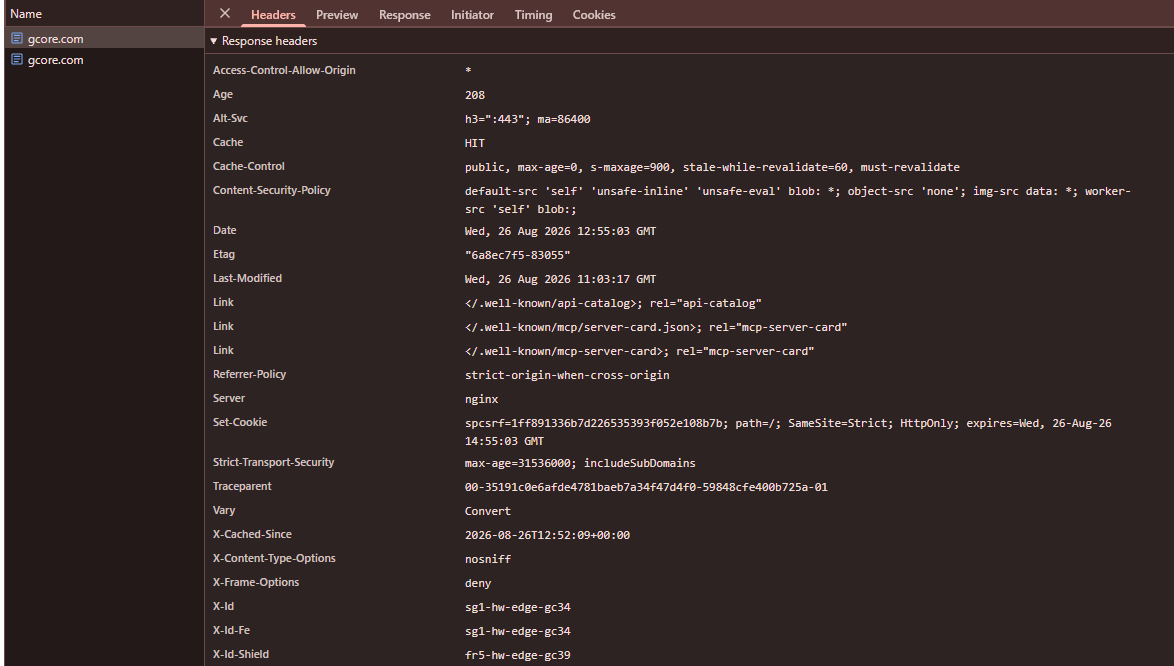
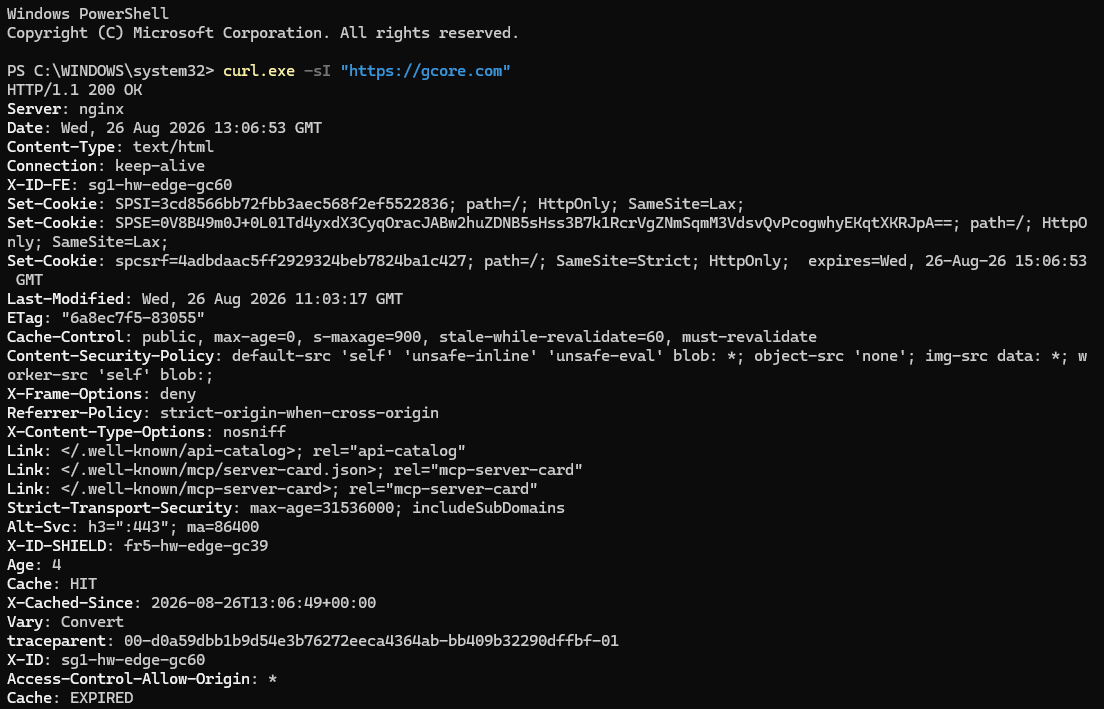 If the origin or application already records W3C Trace Context, match the same `trace-id` in those logs to correlate the request end-to-end.
## Traceparent in Raw logs
[Raw logs](/cdn/logs/raw-logs-export-cdn-resource-logs-to-your-storage) include the `$http_traceparent` field. That field stores the `traceparent` header from the incoming client request — the value the CDN received. It is not the rewritten header forwarded to the origin, and it is not the `traceparent` returned in the CDN response.
If the client omits the header, `$http_traceparent` contains `-`. If the client sends an invalid value, the field contains that original invalid value, while the CDN generates a valid replacement for the request to the origin.
A sample value looks like this:
```
00-d5fe1dc9035165ce36952daf29686b6c-14330be33197dd1a-01
```
In this example, `d5fe1dc9035165ce36952daf29686b6c` is the 16-byte `trace-id`, and `14330be33197dd1a` is the 8-byte `parent-id` from the client's request. The `trace-id` stays the same for the whole request, so it can be matched to origin or APM traces that follow W3C Trace Context. The `parent-id` in `$http_traceparent` is the caller's ID as received from the client. The CDN-generated `parent-id` that the origin records as its parent span ID is in the header forwarded to the origin, not in this log field.
If the origin or application already records W3C Trace Context, match the same `trace-id` in those logs to correlate the request end-to-end.
## Traceparent in Raw logs
[Raw logs](/cdn/logs/raw-logs-export-cdn-resource-logs-to-your-storage) include the `$http_traceparent` field. That field stores the `traceparent` header from the incoming client request — the value the CDN received. It is not the rewritten header forwarded to the origin, and it is not the `traceparent` returned in the CDN response.
If the client omits the header, `$http_traceparent` contains `-`. If the client sends an invalid value, the field contains that original invalid value, while the CDN generates a valid replacement for the request to the origin.
A sample value looks like this:
```
00-d5fe1dc9035165ce36952daf29686b6c-14330be33197dd1a-01
```
In this example, `d5fe1dc9035165ce36952daf29686b6c` is the 16-byte `trace-id`, and `14330be33197dd1a` is the 8-byte `parent-id` from the client's request. The `trace-id` stays the same for the whole request, so it can be matched to origin or APM traces that follow W3C Trace Context. The `parent-id` in `$http_traceparent` is the caller's ID as received from the client. The CDN-generated `parent-id` that the origin records as its parent span ID is in the header forwarded to the origin, not in this log field.