> ## Documentation Index
> Fetch the complete documentation index at: https://gcore-doc-1894.mintlify.site/llms.txt
> Use this file to discover all available pages before exploring further.
# Manage Edge Proxy
Use the **Protected servers** page to enable, disable, reconfigure, or delete a server without reprovisioning it.
## Protected servers
Navigate to **Security → Edge Proxy → Protected servers** to view all configured servers.
Each server card shows:
| Field | Description |
| ---------------- | ------------------------------------------------------------------------- |
| **Server name** | Display label with a toggle to enable or disable protection |
| **Status** | **Online** (active), **Stopped** (paused), or **Processing** (activating) |
| **Proxy IP** | The public IP that clients connect to |
| **Origin** | The origin server IP (masked in the list view) |
| **Applications** | Game protection profiles and configured ports |
### Enable and disable protection
Use the toggle next to the server name to pause or resume protection without deleting the server.
* Toggle **on** — starts activation. The card shows **Processing (\~3 min)** while Gcore provisions the proxy. Once complete, status changes to **Online** and traffic routes through the proxy IP.
* Toggle **off** — protection pauses immediately. Status changes to **Stopped**. The proxy IP remains assigned but stops forwarding traffic.
### Edit a server
Click **Edit protection** on the server card to open the **Edit server** panel.
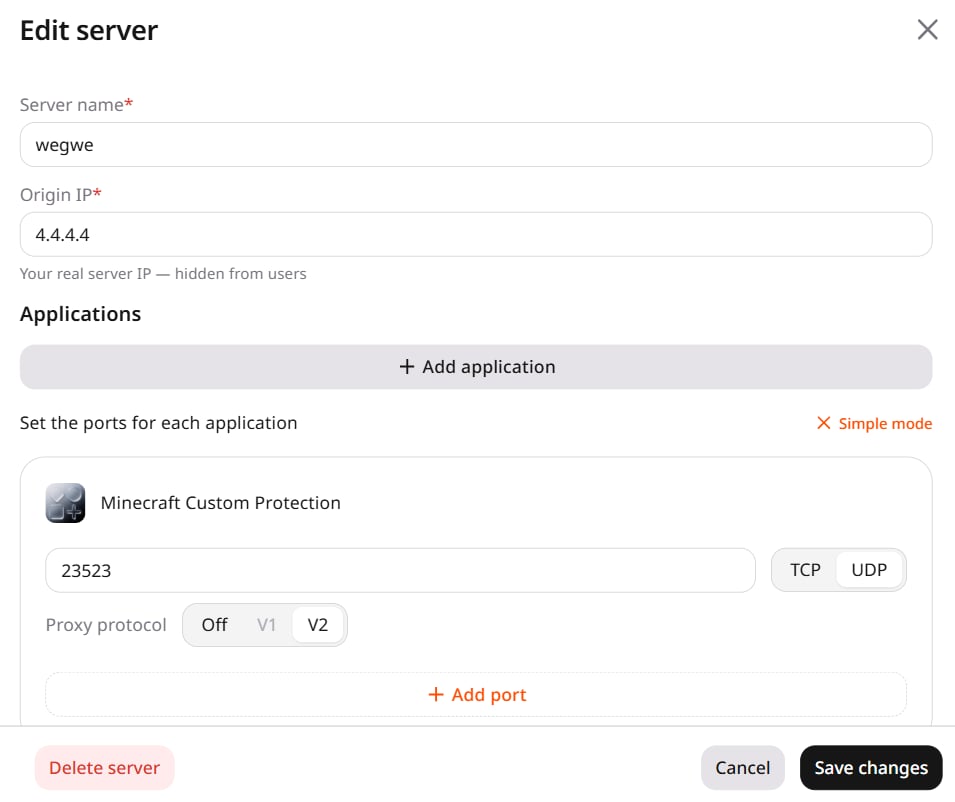 The panel supports the following changes:
* **Server name** — rename the server.
* **Origin IP** — change the origin server address.
* **Applications** — add or remove application profiles. To remove an application, delete all its ports.
* **Ports** — add or remove ports and select the protocol (TCP or UDP).
* **Proxy protocol** — enable PROXY protocol v1 or v2 for individual ports.
Click **Save changes**.
### Delete a server
Click **Delete server** inside the edit panel. A confirmation dialog appears with the server name and the message "This will permanently remove \[name] and all its application configurations." Click **Delete** to confirm.
Alternatively, click **Delete protection** on the server card in the Protected servers list and confirm in the same dialog.
## Monitor traffic
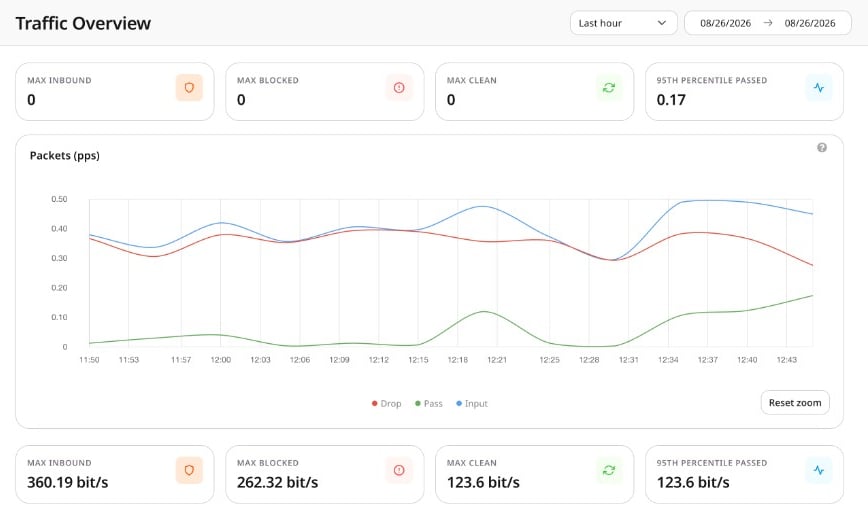
Traffic Overview (**Security → Edge Proxy → Traffic Overview**) displays aggregated traffic across all active servers.
The panel supports the following changes:
* **Server name** — rename the server.
* **Origin IP** — change the origin server address.
* **Applications** — add or remove application profiles. To remove an application, delete all its ports.
* **Ports** — add or remove ports and select the protocol (TCP or UDP).
* **Proxy protocol** — enable PROXY protocol v1 or v2 for individual ports.
Click **Save changes**.
### Delete a server
Click **Delete server** inside the edit panel. A confirmation dialog appears with the server name and the message "This will permanently remove \[name] and all its application configurations." Click **Delete** to confirm.
Alternatively, click **Delete protection** on the server card in the Protected servers list and confirm in the same dialog.
## Monitor traffic
Traffic Overview (**Security → Edge Proxy → Traffic Overview**) displays aggregated traffic across all active servers.
 ### Metrics
The page shows four metrics for packets (pps) and bits (bps), and two charts — **Packets (pps)** and **Bits (bps)** — each plotting **Input** (all received), **Drop** (blocked), and **Pass** (forwarded to origin). Use the dropdown to select a time range from one hour to three months, or set a custom range with the date fields.
| Metric | Description |
| -------------------------- | --------------------------------------------------------------- |
| **MAX INBOUND** | Maximum total traffic received at the Edge Proxy endpoint |
| **MAX BLOCKED** | Maximum traffic identified as malicious and dropped |
| **MAX CLEAN** | Maximum clean traffic forwarded to the origin server |
| **95TH PERCENTILE PASSED** | 95th percentile of traffic forwarded during the selected period |
### Metrics
The page shows four metrics for packets (pps) and bits (bps), and two charts — **Packets (pps)** and **Bits (bps)** — each plotting **Input** (all received), **Drop** (blocked), and **Pass** (forwarded to origin). Use the dropdown to select a time range from one hour to three months, or set a custom range with the date fields.
| Metric | Description |
| -------------------------- | --------------------------------------------------------------- |
| **MAX INBOUND** | Maximum total traffic received at the Edge Proxy endpoint |
| **MAX BLOCKED** | Maximum traffic identified as malicious and dropped |
| **MAX CLEAN** | Maximum clean traffic forwarded to the origin server |
| **95TH PERCENTILE PASSED** | 95th percentile of traffic forwarded during the selected period |