

fit parameter.
An origin server hosts an 1100×1500 px image. With width=200, height=150, the CDN reduces the image before delivering it to end users. The origin retains the original 1100×1500 version; users receive the 200×150 reduced version:
- Original image
- Resized image


Enable resize
Resize is included in the paid Image Stack option. This option optimizes images by converting them to WebP or AVIF format, cropping them, or adjusting their quality and size. To use Resize, activate Image Stack according to the Enable Image Stack guide.Use resize
Add the relevant Resize query parameters to the image URLs in the website source code. 1. Open the website source code. 2. Find the strings with the URLs of the images to reduce using Resize. 3. Add the query strings to the URLs of the images. A query parameter should be set as follows:Width
Width
Width compresses an image while preserving the aspect ratio of the original image. This parameter sets the target width of the new image in pixels. The height is automatically adjusted to maintain the original aspect ratio.
Example. An origin server hosts a 900×600 image (W×H). With 
width=300: the width is reduced by three, and the height is also reduced by three. Result: 300×200.- Before: image.jpg
- After: image.jpg?width=300

Height
Height
Height compresses an image while preserving the aspect ratio of the original image. This parameter specifies the target height of the new image in pixels. The width is automatically adjusted to maintain the original aspect ratio.
Example. An origin server hosts a 900×600 image (W×H). With
height=300: the height is reduced by two, and the width is also reduced by two. Result: 450×300.- Before: image.jpg
- After: image.jpg?height=300
Fit
Fit
Fit controls how the image is reduced: cropped from sides, compressed keeping the original aspect ratio, or compressed ignoring the aspect ratio.
To use
fit, specify both width and height, then add the fit parameter: image.jpg?width=300&height=100&fit=…
If only width and height are specified without fit, the default fit=fit is applied. There are four possible values for fit:- Before: image.jpg
- After


Check HTTP headers
TheX-Img-Operations header reflects all conversions performed on an image. If the value includes resize, the image size has changed.
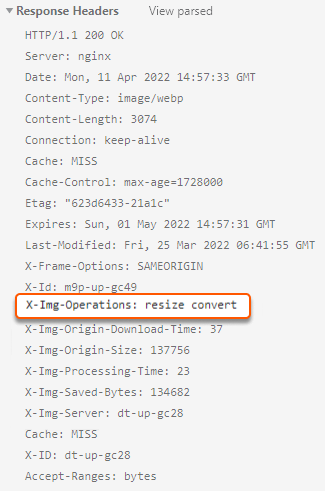
resize value and the CDN returns the origin image, check the Img-skip-reason HTTP header. This header explains why the resize operation was skipped.